
About us
Business Intelligence
for your company
We start here
When we start a business intelligence process with you, it is based on your company.
Company maturity
We adapt our solutions to your level of experience in BI, whether you are a beginner or an experienced user.

Maturity 0
You want to move away from reporting in Excel or directly in your ERP system. With the increasing amount of data, you need a more efficient and advanced solution, and therefore you are considering implementing Business Intelligence.
In addition, you want to integrate Power BI with your operational systems to gain better insight and create more valuable analyses across your data.

Maturity 1
You already have a Business Intelligence tool, but want to optimize its use.
Your goal is to create user-friendly reports with a clear and intuitive design so that employees can easily understand and act on the data analyses.

Maturity 2
As experienced users of Business Intelligence, you already share dashboards, reports and analyses across your organization. Now you want to elevate your data analysis by implementing advanced KPI calculations, performing in-depth what-if analyses and integrating AI into solutions and processes. These initiatives will give you deeper insights and increase the flexibility of your analytical work, which will strengthen your decision-making and uncover new business opportunities.
Vision for the final product
We listen to your wishes and needs to create exactly the BI solution that provides the most value for you.
We start with the end product and focus on three key areas:
KPQs (Key Performance Questions):
- Identifies the most important questions for the business
- Ensures focus on relevant areas for data analysis
- Avoids wasting resources on irrelevant data
UI (User Interface):
- Defines the visual design of the report
- Determines interactivity and user flexibility
- Determines access levels for different user groups
UX (User Experience):
- Ensures the understandability of the report
- Implements effective data storytelling
- Creates a clear narrative for the user
The result is a cost-effective BI report that allows you to evaluate the value of Business Intelligence without a full implementation. You get a clear picture of how BI can improve your data analysis, decision-making processes and identify potential gains.

Automation
We identify areas where automation can free up resources and increase efficiency in your daily operations.
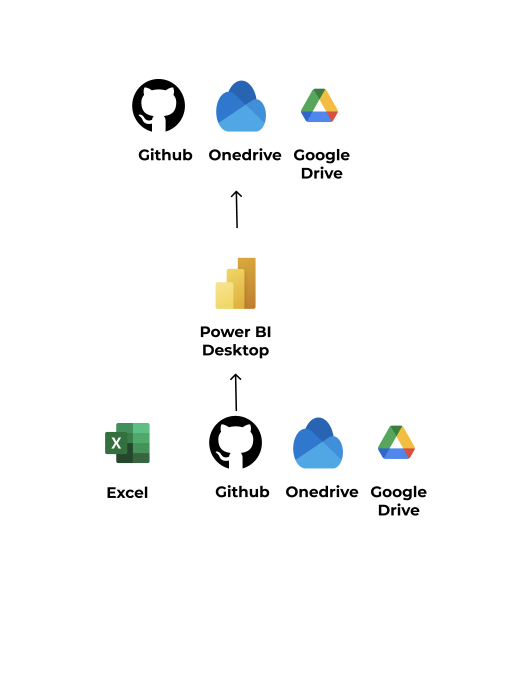
Prerequisites
Excel Online
Power BI Desktop
OneDrive
GitHub
Google Drive
Manual steps
Overwrite/replace Excel file connected to Power BI
Refresh data in Power BI Desktop
Indicative licensing
Power BI Desktop: Free
Excel Online: Free
OneDrive: Free
Distribution
OneDrive
GitHub
Google Drive
Limitations
Power BI Desktop: No RLS
OneDrive: Up to 5 GB storage
GitHub: Up to 1 GB storage
Google Drive: Up to 15 GB storage
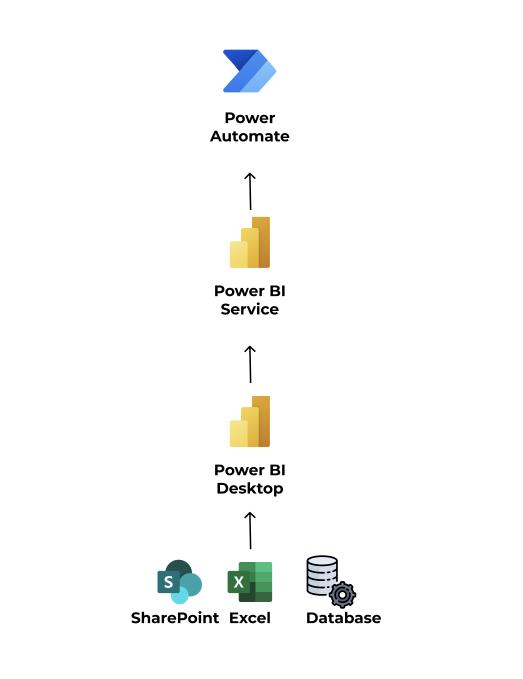
Prerequisites
Excel
SharePoint
Power BI Desktop
Power BI Service
Automation
Data Alerts: Workflows triggered by Power BI data alerts initiate actions in Power Automate.
Report Distribution: Export and distribute Power BI reports via email or other channels.
Button Triggers: Embed Power Automate buttons directly into Power BI reports.
Data-Driven Flows: Dynamic inputs to Power Automate flows from Power BI reports
Instructional Licensing
SharePoint: MS 365 license
Power BI: Power BI Pro
Power Automate: Free
Scheduling
Automatic data refresh up to 8 times per day
Limitations
Max 750 runs per month with Power Automate
Basic Automation
Basic AI Features
Data Model Size Up to 1 GB
Workspace Size Up to 10 GB
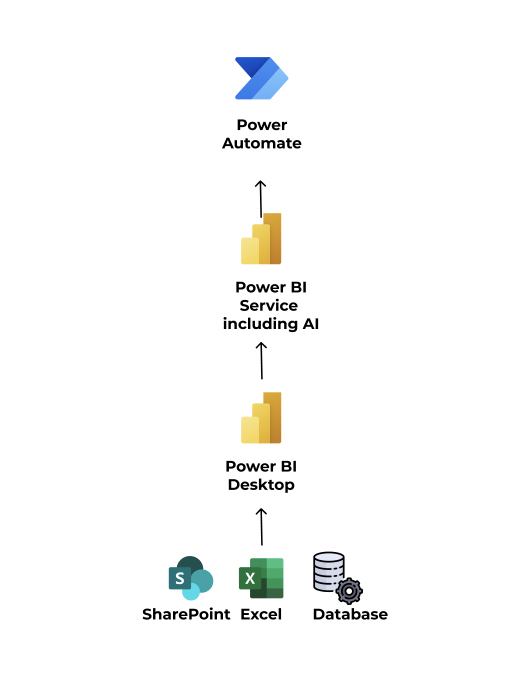
Prerequisites
Excel
SharePoint
Database
Power BI Desktop
Power BI Service
Automation
Data Refresh: PPU allows up to 48 data refreshes per day.
Advanced AI capabilities: Form processing, object recognition, and text classification with AI Builder credits.
Unlimited Cloudflows: Power Automate Premium allows the creation, running, and sharing of unlimited Cloudflows within Power Platform request limits.
Premium Connectors: Access to a wide range of premium connectors for integration with various applications and services.
Robotic Process Automation (RPA): Power Automate Premium includes desktop automation capabilities.
Process Mining: Full access to process mining capabilities.
XMLA Endpoints: PPU provides XMLA read/write access.
Deployment Pipelines: PPU includes automated deployment pipelines for managing the lifecycle of Power BI content.
Dataflows and Datamarts: PPU offers higher-performance dataflows and self-service datamarts for improved data preparation and storage automation.
Guided Licensing
SharePoint: MS 365 License
Power BI Premium Per User
Planning
Automatic data refresh up to 48 times per day.
Future-proof scalability
We design flexible solutions that grow with your business and future needs.
By focusing on these four aspects, we ensure that your BI journey not only meets your current needs, but also optimally positions you for future growth and success.
Let’s explore together how we can transform your data into valuable business insights!
From questions to insights – a proven process
Our approach is built on understanding, collaboration, and tailor-made solutions that can be continuously adapted and scaled. We work with you to create a solution that supports your business goals and daily decision-making processes.
The process
Requirements clarification
We start by uncovering your goals and the questions that are essential to your business's success.
Data modeling
With modern data analysis methods, we build a robust and flexible data model.
Visualization
We create clear and user-friendly reports and dashboards that make complex data manageable.
Support and training
We offer ongoing support and training so you get the most out of your BI solutions.